Example 3: Loading from a file
This example demonstrates how to solve a Distance-based Critical Node Problem (DCNP) by loading an existing instance from a file. The DCNP adds a hop distance constraint to the standard CNP.
Problem description
The Distance-based Critical Node Problem (DCNP) extends CNP by considering hop distance. Two nodes are considered “connected” only if their shortest path distance is strictly less than a predefined hop distance limit b. This models scenarios where only nearby nodes can influence each other.
In this example, we:
Load a DCNP instance from an edge list format file
Set the budget to 10% of the total nodes
Use the BCLS (Betweenness Centrality Late Acceptance Search) strategy
Solve with a time-based stopping criterion
Loading the instance
PyCNP supports reading problem instances from files in two formats: adjacency list and edge list. The read() function automatically detects the format:
from math import floor
from pycnp import Model, read
from pycnp.MemeticSearch import MemeticSearchParams
from pycnp.stop import MaxRuntime
from pycnp.visualization import visualize_graph

# 1. Load an existing DCNP instance from a file
problem_data = read("Hi_tech.txt")
model = Model.from_data(problem_data)
Creating the model
We create a model from the loaded problem data:
# Create a model from the problem data
model = Model.from_data(problem_data)
Configuring problem parameters
For DCNP, we need to specify the hop distance limit. In this example, we set the budget to 10% of the total nodes:
# 2. Configure problem parameters
problem_type = "DCNP"
budget = floor(0.1 * problem_data.num_nodes())  # 10% of nodes
seed = 49
stopping_criterion = MaxRuntime(5)  # Stop after 5 seconds
Configuring the memetic algorithm
For DCNP problems, the BCLS (Betweenness Centrality Late Acceptance Search) strategy is recommended. We use fixed population sizing (no variable population) in this example:
# 3. Configure memetic search with problem reduction
memetic_params = MemeticSearchParams(
    search="BCLS",           # Betweenness Centrality Late Acceptance Search
    is_problem_reduction=True,  # Use RSC crossover
    is_pop_variable=False,   # Fixed population size
    initial_pop_size=5,
    reduce_params={"search": "BCLS", "beta": 0.9}
)
The reduce_params dictionary configures the RSC (Reduce-Solve-Combine) crossover:
search: Local search strategy used within RSC
beta: Fraction of common nodes to preserve (0.9 means 90% preservation)
Solving the problem
We solve the DCNP instance with a hop distance constraint:
# 4. Solve the instance via FTMS (Fixed Population Memetic Search)
result = model.solve(
    problem_type,
    budget,
    stopping_criterion,
    seed,
    memetic_params,
    hop_distance=3,  # DCNP: nodes within 3 hops are considered connected
    display=True,
)
The hop_distance parameter specifies the maximum hop distance for DCNP connectivity. Two nodes are considered connected only if their shortest path distance is less than this value.
Results
After solving, we can access the solution:
print(f"Removed nodes: {result.best_solution}")
print(f"Remaining connectivity: {result.best_obj_value}")
print(f"Number of iterations: {result.num_iterations}")
print(f"Runtime: {result.runtime:.2f} seconds")
print(f"Best solution found at: {result.best_found_at_time:.2f} seconds")
You obtain output similar to:
Removed nodes: {1, 18, 20}
Remaining connectivity: 293
Number of iterations: 92
Runtime: 5.02 seconds
Best solution found at: 0.18 seconds
Understanding the output
best_solution: Set of node IDs removed from the graph
best_obj_value: Pairwise connectivity considering hop distance constraints
num_iterations: Number of algorithm iterations performed
runtime: Total execution time in seconds
best_found_at_time: Time when the best solution was discovered
Visualizing the result
PyCNP provides an interactive graph visualization:
# 5. Visualize the result
visualize_graph(
    problem_data=problem_data,
    critical_nodes_set=result.best_solution,
)
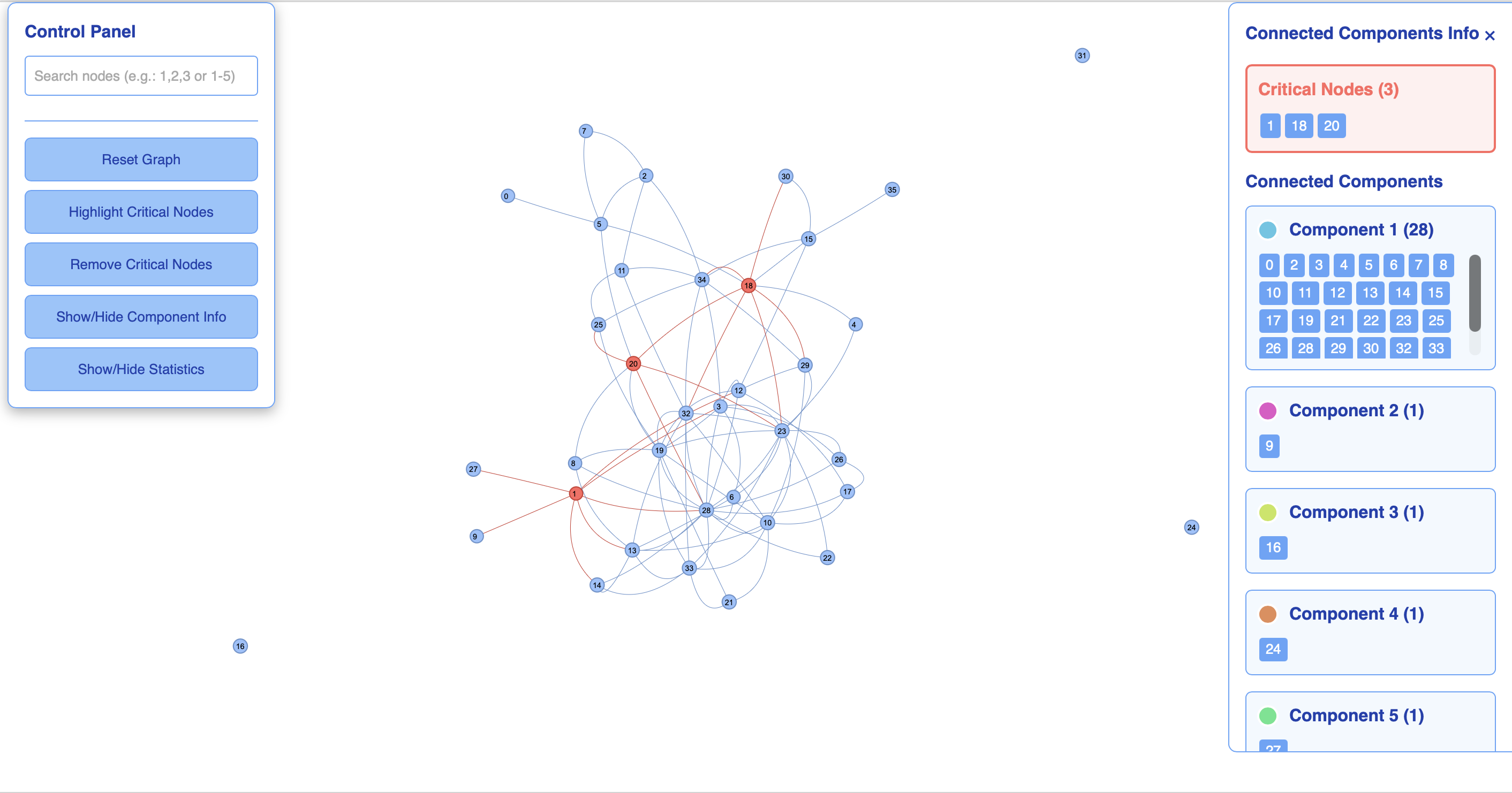
The visualization shows the original graph with critical nodes highlighted in a different color.